Free practice tool
Seconds per measure calculator
Calculate one, four, or any number of measures, convert a time in seconds back to measures, and compare common BPM values.
Screens from SheetCue 1.14.0
The short answer
At 120 BPM, one 4/4 measure lasts 2 seconds and four measures last 8 seconds. Seconds per measure = beats per measure × 60 ÷ BPM at 1.0× speed.
Common BPM reference table
At 1.0× with quarter-note BPM, compare fixed 4/4 and 3/4 timings. Values are in seconds, rounded to two decimal places.
| BPM | 4/4 (4 beats), one measure | 3/4 (3 beats), one measure | 4/4 (4 beats), four measures |
|---|---|---|---|
| 60 | 4 seconds | 3 seconds | 16 seconds |
| 72 | 3.33 seconds | 2.5 seconds | 13.33 seconds |
| 80 | 3 seconds | 2.25 seconds | 12 seconds |
| 90 | 2.67 seconds | 2 seconds | 10.67 seconds |
| 100 | 2.4 seconds | 1.8 seconds | 9.6 seconds |
| 110 | 2.18 seconds | 1.64 seconds | 8.73 seconds |
| 120 | 2 seconds | 1.5 seconds | 8 seconds |
| 132 | 1.82 seconds | 1.36 seconds | 7.27 seconds |
| 140 | 1.71 seconds | 1.29 seconds | 6.86 seconds |
| 160 | 1.5 seconds | 1.13 seconds | 6 seconds |
Calculate seconds per measure
Results update as you change the fields.
One measure: 2 seconds. Four measures: 8 seconds. Entered measure total: 16 seconds; Minutes:seconds (rounded): 0:16. Estimated measure count: 30 measures. Repeated passage estimate: 80 seconds; Minutes:seconds (rounded): 1:20.
How the calculation works
BPM tells you how many beats fit in one minute. Dividing 60 by BPM gives seconds per beat; multiplying by the number of beats gives the duration of one measure. Use the same beat unit in both inputs: if 6/8 BPM counts dotted-quarter beats, enter 2 beats per measure; if it counts eighth notes, enter 6.
How this maps to SheetCue
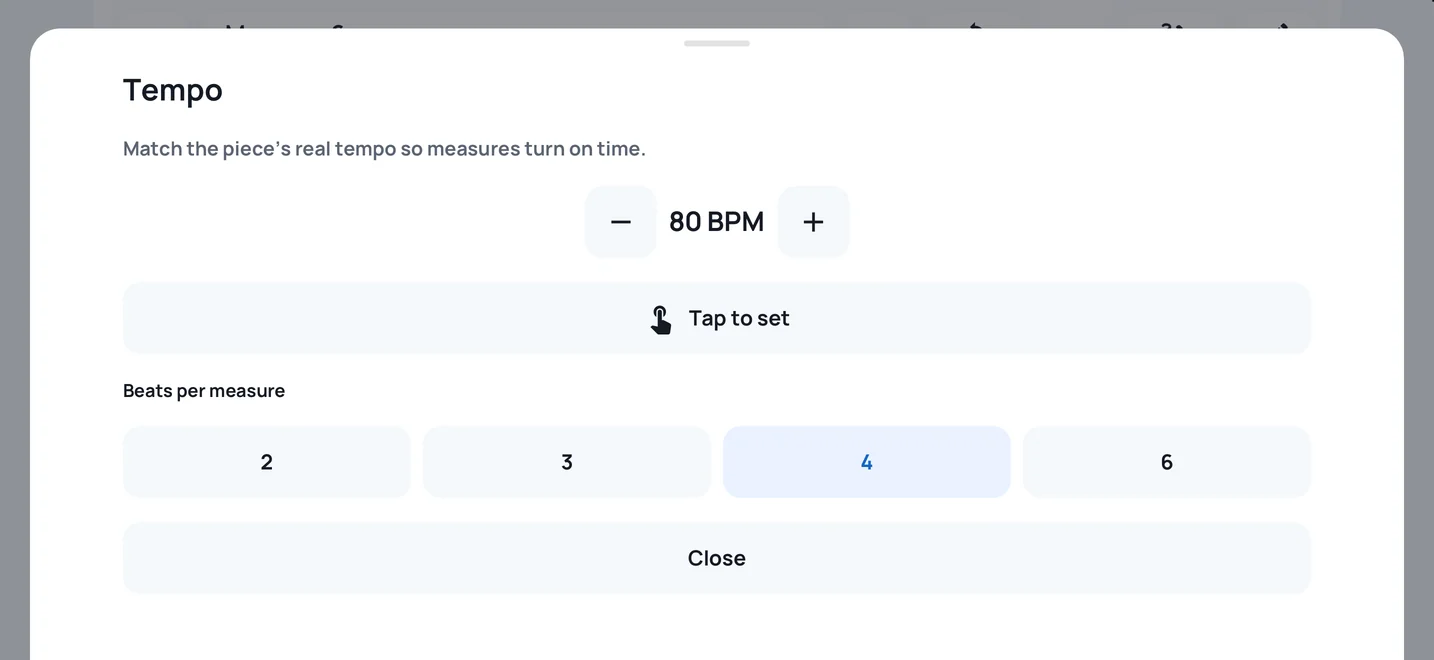
Pause playback and tap the BPM value in the header to open “Tempo”. You can also choose “Did that look right?” → “The tempo is off”. Choose 30–260 BPM with − / +: one BPM per tap, five when held. “Tap to set” lets you tap a steady beat. “Tempo” offers 2, 3, 4, or 6 beats per measure. For other counts from 1–64, use “Edit” → “Score default playback settings”. For one measure, use “Edit” → “Crop Edit” → “Timing” → “Selected BPM” or “Selected beats”.
What the estimate leaves out
The result is a timing estimate. Fermatas, rubato, pauses, count-in, tempo changes, and time-signature changes need separate judgment or per-measure settings.
Frequently asked questions
How long is one 4/4 measure at 120 BPM?
With four quarter-note beats, it is 2 seconds: 4 × 60 ÷ 120.
How long are four measures at 120 BPM?
With four beats per measure, four measures last 8 seconds: 4 × 60 ÷ 120 × 4.
Which values can I use in SheetCue?
30–260 BPM; 2, 3, 4 or 6 beats in “Tempo”, and 1–64 in the editor.
Put the timing into a measure-by-measure practice flow.
SheetCue lets you set baseline BPM and beats, then correct individual measures when the music needs it.